
Ezi-Mate Junction Box Problems
The yellow plug-in junction box on Brent, Unverferth, Parker, Killbros and Orthman carts is one of the most common causes of jumping and drifting weights we see. Here is how to check it, and the fix that lasts.
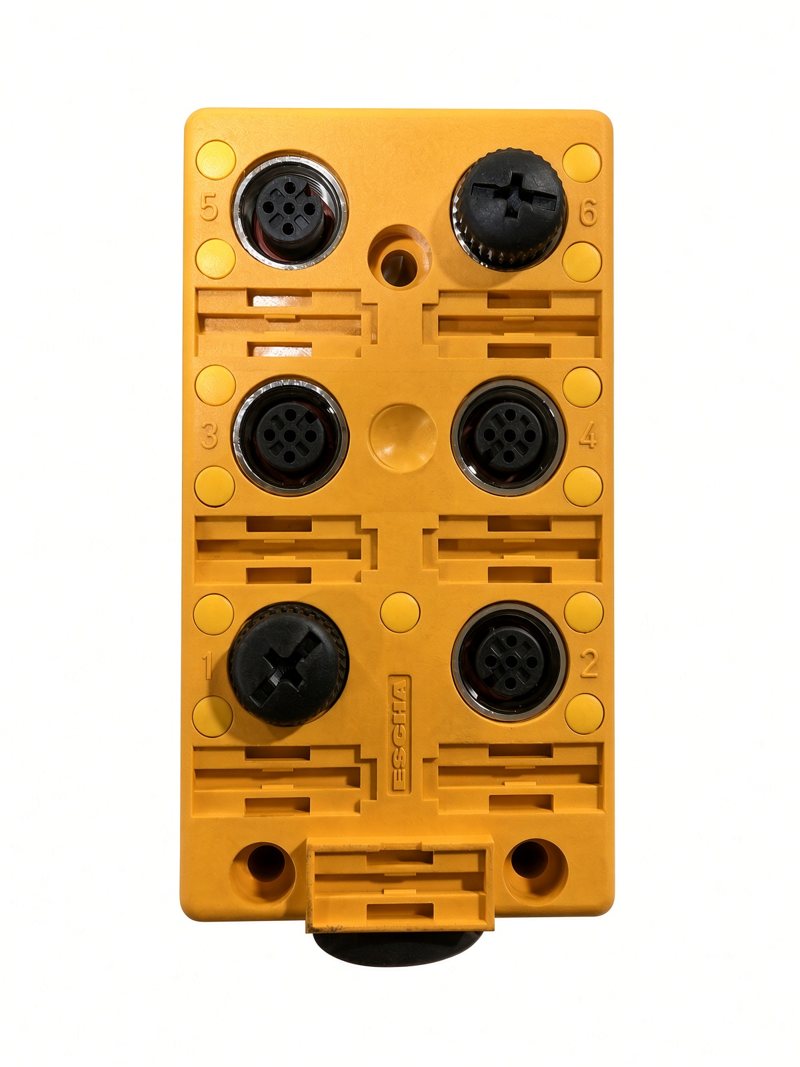
Is this your junction box?
The Unverferth family of grain carts - Brent, Unverferth, Parker, Killbros and Orthman - uses the Ezi-Mate system. Each weigh bar has a round screw-on M12 plug, and they all plug into this yellow box. One more cable, the main (home-run) cable, carries the weight to your Libra or scale head.
The plugs make install easy. The weak spot is that same plug-in connection: the sockets can stop making a good contact, a plug can crack or work loose, and water gets into a connector after rain or a pressure wash.
What it looks like when the box is the problem
- The weight jumps or swings by thousands of pounds, sometimes into the negatives, with nothing changing on the cart.
- The reading drops out, or shoots up to hundreds of thousands of pounds.
- It is fine one day and bouncing the next, often after rain.
- You keep recalibrating and the calibration number keeps creeping.
Do not calibrate around it. If the scale is not weighing right, calibrating only hides the fault until it gets worse. Find the cause first.
Check it, in this order
- Turn off automatic unload detection in the app (or you will record fake loads while you test).
- Look at every plug. Each coupling nut should be snug by hand. Unused sockets should have their dust caps on. Look for green or white corrosion, water, or bent pins in the sockets, and for pinched, cut or chewed cables - on a walking tandem start where the cable goes into the frame.
- Rule out the Libra box. Unplug the main cable at the Libra. The reading should float up to several hundred thousand, even a million. That means the box is fine and the problem is on the cart side.
- Find the bar or socket. At the Ezi-Mate box, unplug every weigh bar but one, zero the display, and watch it. A good bar holds within about 10 to 20 lb. Plug the next one back in, zero again, and keep going. The one that makes it drift or jump - or the socket it is plugged into - is your problem. Swapping that bar into a spare socket tells you which.
- Meter the suspect bar at its own plug. Red to black should be about 350 ohms, and green to white about 350 ohms (pin positions are in the picture below). About 700 ohms means a bad bar. No reading or a low reading points to the cable. See testing a weigh bar with a meter.
- Wet? Dry the plugs and sockets out and test again before you buy anything.
Try it: find the bad bar
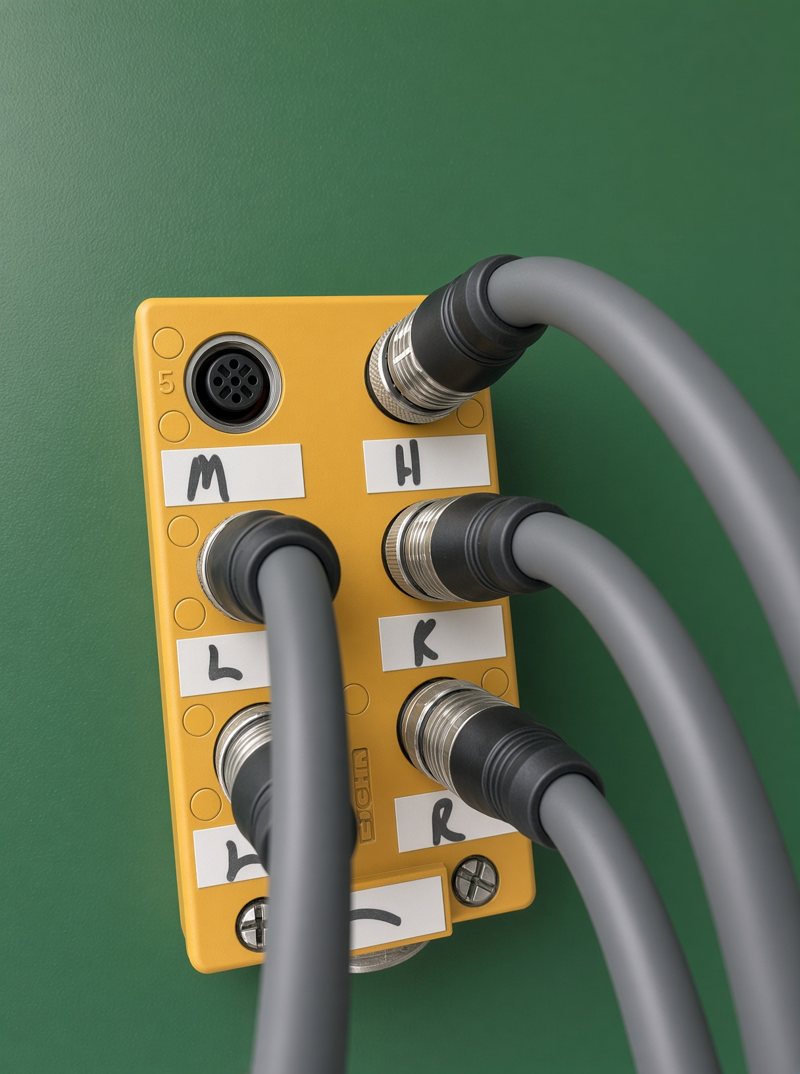
Label your sockets like this one and testing gets easy. We write them on in permanent marker: M for the main (home-run) cable, H for the hitch bar, then one per weigh bar location - L and R on a 3-point cart, or LF, RF, LR and RR (left front, right front, left rear, right rear) on a 5-point cart. Below, tap a socket to unplug or plug its cable, press Zero, and watch the weight - practice only, the numbers are made up.
Loading... If nothing appears, call 800-582-3175.
Ezi-Mate plug colors
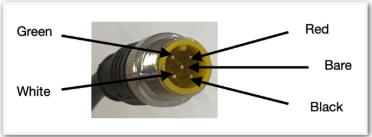
| Terminal | Color |
|---|---|
| + Excitation | Red |
| - Excitation | Black |
| + Signal | White |
| - Signal | Green |
| Ground | Bare / Orange |
Meter it like this: red to black (the right side) should read about 350 ohms, and green to white (the left side) about 350 ohms. The bare center pin to any of the others should read nothing at all - open is the good result.
The fix
If the box or its sockets are the problem, there are two ways to go:
- Replace the Ezi-Mate box with a new one - Ezi-Mate junction box, $295. Quickest, and everything still plugs in.
- Go to a spring-loaded junction box - what we usually recommend. The plug ends are cut off and each weigh bar is wired straight into the terminals, color for color, so there are no plug-in contacts left to fail. Check the color codes first: Weigh-Tronix and Digi-Star use different colors.
Switching to a spring-loaded junction box
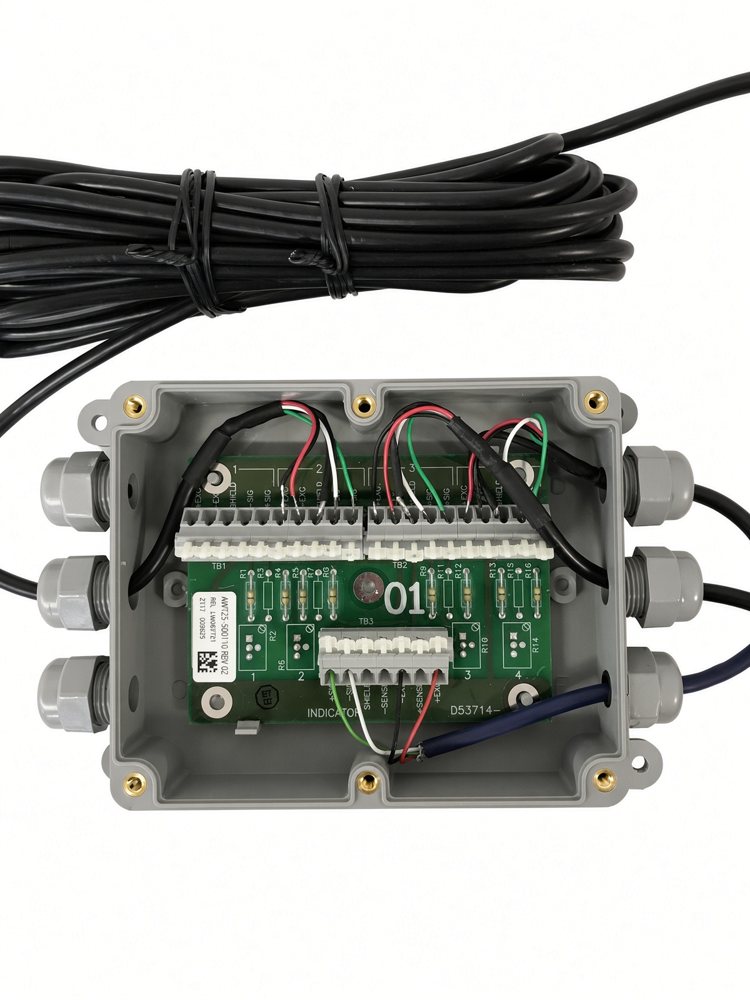
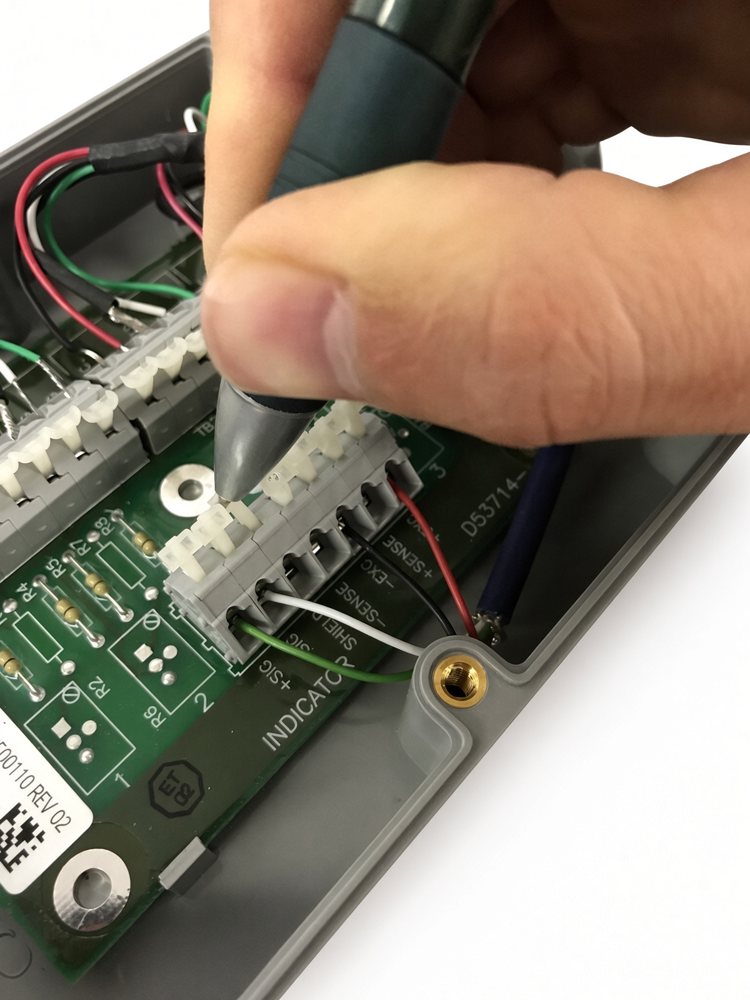
The spring-loaded box does the same job as the Ezi-Mate box, but every wire is clamped in its own terminal instead of passing through a plug. To switch, the plug ends come off the Ezi-Mate weigh bar cables and each wire goes to its own terminal:
- Unplug each weigh bar from the Ezi-Mate box and cut the round plug off its cable. Keep as much cable as you can.
- Strip back the outer jacket and the end of each wire.
- Give each weigh bar its own numbered terminal set. On a five-bar cart one set takes two bars.
- Press the white lever down with a small screwdriver or pen tip, push the wire all the way in, and let go. Match each wire to the label printed on the board: red to +EXC, black to -EXC, white to +SIG, green to -SIG, bare to SHIELD.
- Tug each wire to be sure it is held, run the cables through the glands, tighten the glands and close the lid.
- Zero the scale and check it - stand on each bar or weigh a known load before you go back to the field.
Not comfortable wiring it? We can wire the box here before it ships, or do the whole swap for you.
Parts: Ezi-Mate junction box, Ezi-Mate home-run cable, 26' ($195), spring-loaded junction box, spring-loaded junction box with 25' cable, splice kits for a damaged cable. Not sure what you have? Send us a photo of the box and the cart's make and model.
Want it done for you? We can build the box ready to bolt on, or do the swap here. Call 800-582-3175.
More Libra help by symptom: Libra won't weigh right? Start here.